OVERVIEW  Top Next

The Assets subsystem of CES offers facilities to


Introduction
 
The Assets sub system of CES is used to determine depreciation for the purpose of Income Tax and Company Law.
The depreciation can be determined either based on asset depreciation categories or asset.
The asset details can be entered or extracted from the books.
Depreciation for Income Tax / Company Law
 
The Depreciation can be determined separately for
 
These are available by asset and accounting year.
The Commissioning date is taken as the basis for calculating the depreciation.
 
Depreciation can be determined by running a ledger for the period desired viz. A month, quarter, half-year or a year
 
You can run take out a depreciation report by month , half yearly.
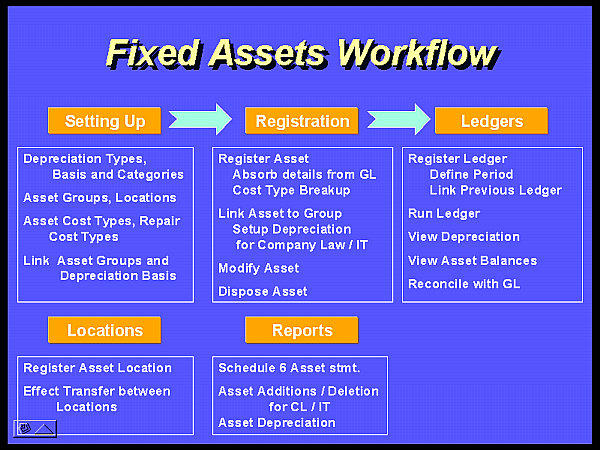
Work flow


Depreciation Categories
 
The depreciation categories can be registered to indicate the depreciation method for Income Tax and Company law.
 
The Depreciation methods are as follows:-
For each category the residual depreciation basis is also indicated viz. Pro-Rata / Cut-off Month basis (September)
 
Asset Grouping
   
Asset can be grouped such as Plant, Equipment, Land etc..
 
Asset Locations
 
Asset Location can be pre-defined to associate the location of the Asset.
Additionally a sub location can be specified in the Asset detail.
 
Asset Details
 
The Asset details can be registered with following details
Copy/Enter Voucher Details
 
Residual Depreciation
The residual depreciation is applied for assets bought with in the accounting Year. Two methods are available for the residual depreciation
 
 
Cut off month Method
In this method the residual depreciation percentage is applied whenever the commissioned date (for the cost type) is after the cutoff month
 
Example (Case-1)
The commissioned date of an asset value 10000/- being lst December 95.
The Cut off month is September with residual depreciation of 5%
The residual depreciation in the corresponding Year is 10000 * (5/100) = 500
 
Pro Rata Method
In this method the residual depreciation percentage is applied for the period in use in the accounting Year.
 
Example (Case-2)
The commissioned date of an asset value 10000/- being lst December 95 and a residual Percentage of 10%
The residual depreciation in the corresponding Year is 10000 * (10/100) * (4/12) = 333
 
Asset Disposal
 
Asset disposal is recorded in the Books This information can be absorbed through a facility provided in the Fixed Assets system.
 
The Asset disposal can be partial or complete disposal. In either case the impact of it can be recorded as a single disposal entry in assets in an accounting Year.
 
The manner in which the impact of disposal of asset is recorded for
 
The asset disposal details available are
 
Determine Depreciation
 
The depreciation is determined for an accounting year, quarter, half-year or month. This is identified by a ledger identity. The ledger identity is associated with Income Tax or Company Law for which the depreciation is determined.
 
Asset Balances (Ledger) Year or month
The asset balances are maintained by asset / Ledger id. Since Ledger id is associated with the year id and Income Tax / Company Law.
 
The Balance can be viewed accordingly viz.
Asset Statement
 
The Asset statement is also available
 
The Asset Statement contains the following details:-
 
Asset Location Transfer
 
Preset for Assets System
 
 
Facilities in the system
 
Setting up
 
AS01Maintain Presets for Fixed Assets
AS02Maintain Accounts for Asset/Depreciation
AS03Maintain Depreciation Types
AS04Maintain Depreciation Basis
AS05Maintain Fixed Asset Groups
AS06Maintain Depreciation Category
AS07Maintain Assets Group Depreciation Basis
AS08Maintain Asset Cost Type
AS09Maintain Asset Location
AS10Maintain Asset Maintenance Cost Type

 
Asset Registration
AS21Register Asset Details
AS22Asset/Group/Depreciation Linking
AS53View Asset Details

 
Asset Disposal
AS23Asset Disposal

 
Asset Ledger
AS32Asset Ledger Control
AS33Run Asset Ledger
AS31Ledger Opening Balance
AS34Maintain Asset Ledger Balances
AS35View Asset Depreciation

 
Asset Locations
AS51Raise Asset Location Transfer
AS52Effect Location Transfer

 
Reports
AS71Asset Sanction Print
ASR1Assets Additions – CL
ASR2Assets Deletions Report
ASR3Assets Deletion Details - CL
ASR4Assets Additions – IT
ASR5Assets Depreciation – CL
ASR6Assets Depreciation – IT
ASR7Depreciation statement Division wise - CL
ASR8SCHEDULE 6